This is general operational guidance, not legal, clinical or regulatory advice.
Health and wellbeing dashboard projects usually start with a sensible goal. Give a client, program manager or clinical lead a clearer view of participation and progress.
The trouble starts when someone asks for more detail. Break it down by location. Then by team. Then by role, or by pathway.
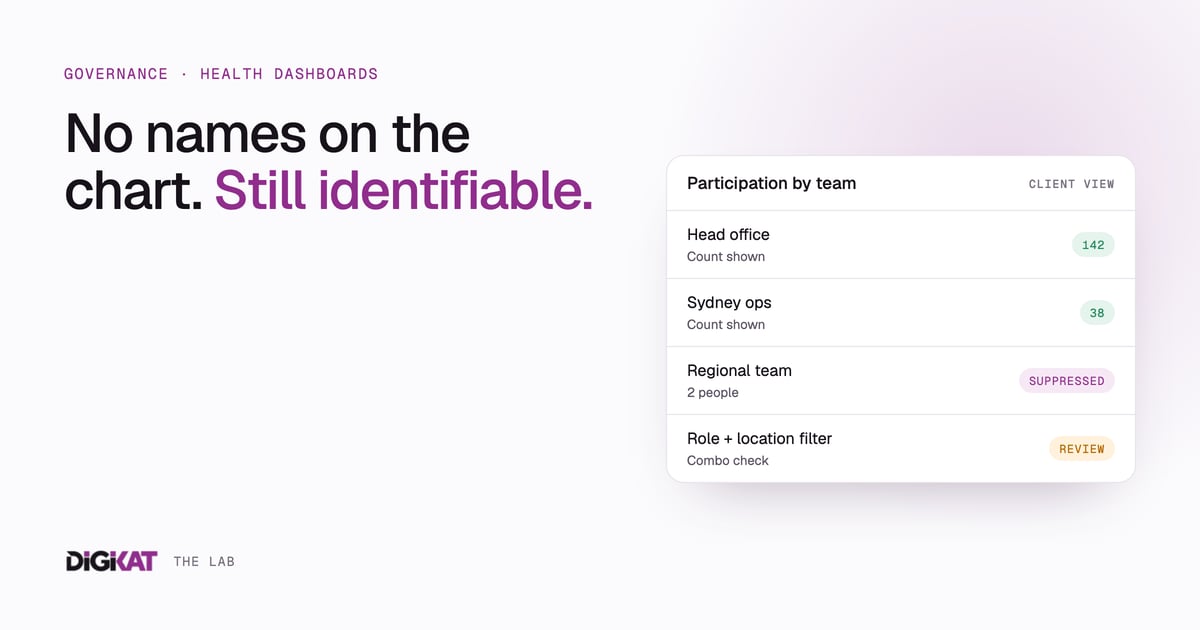
A dashboard can contain no names and still give people away. If a subgroup has one or two people in it, a viewer may be able to work out who took part, which pathway they chose or how they responded.
So privacy is a reporting-design problem as much as a database-security one.
What the Australian guidance says
The OAIC's Guide to health privacy is written for a wide range of providers, from doctors and private hospitals to allied health, pharmacies and gyms. Health information is sensitive information under the Privacy Act and gets extra protection.
Three pieces of guidance matter most for dashboards.
- APP 3: collect only what you need. The OAIC's APP 3 guidelines limit collection to what's reasonably necessary for your functions or activities, and describe a data minimisation approach. Every field you collect "just in case" is another dimension someone can filter by.
- APP 11: protect what you hold. The APP 11 guidelines expect reasonable steps to protect personal information, using both technical and organisational measures. Who can see a dashboard is one of those measures.
- De-identification is about context. The OAIC's De-identification and the Privacy Act guidance says information is de-identified when there's no reasonable likelihood of someone being re-identified. Removing names isn't enough on its own. You also need to deal with other identifying details, or control the environment the data is accessed in. Who can see it, and what else they already know, are part of the test.
That last point is the one dashboards trip over. The same table can be fine for a privacy officer and identifying for a manager who knows everyone in the team.
None of this guidance sets one minimum group size for every report. A suppression threshold is a design decision based on how sensitive the data is, who's looking, what they already know, and what happens if someone is identified. For complex or wide releases, the OAIC points to the De-Identification Decision-Making Framework it produced with CSIRO's Data61, and to specialist advice.
How small counts become people
Picture a report showing participation by business unit, state and job role. A regional team has two people. One has completed a health assessment. That count says more than anyone intended.
The same thing happens in a telehealth dashboard that combines treatment pathway, location and appointment status. Each filter on its own looks harmless. Stacked together, they can point straight at one patient.
It gets worse when viewers already know the people in the group. Workplace knowledge, rosters and other reports all fill in the gaps.
More filters, less safety
Teams add fields because someone might want them later. That causes two problems. People get asked for information with no clear purpose, and dashboards pile up dimensions that can expose small groups.
A better first question: what decision does this dashboard need to support? I made a similar point in Stop building dashboards. If a chart doesn't change a decision, it's only adding risk.
A safer pattern in HubSpot
1. Start with one governed record
Define the record model before you build reports. Store only the fields the agreed purpose needs, document where each one comes from and name who's accountable for its quality. HubSpot works well as the operational record. It works badly as a dumping ground for every attribute you can find. (See what happened after deleting 300 HubSpot properties.)
2. Separate individual operations from aggregate reporting
Staff may need an individual record to deliver a service, manage consent or fix an exception. A client-facing dashboard usually needs aggregates. Treat them as different use cases with different views, permissions and retention.
3. Suppress small groups, everywhere
For each breakdown, decide when a number gets replaced with something like "below reporting threshold". Apply it the same way across charts, exports and drill-downs. Then test combinations: a safe business-unit total can become unsafe once you filter by location and role.
Treat the threshold as a documented risk decision, approved by whoever is accountable for privacy. A developer default isn't good enough.
4. Use named access
Decide exactly who sees the dashboard, what they need and how access is removed when they leave. Shared passwords and open links are quick, but hard to trace and easy to pass on. Where the risk warrants it, use named users, least-privilege permissions and a clear onboarding and offboarding process.
5. Put bounded automation around it
Automation can prepare data, refresh counts, flag missing fields and route exceptions. It shouldn't quietly widen the audience, invent categories or release a sensitive view. A bounded agent can:
- check whether a group is under the agreed threshold
- prepare a suppressed view for approval
- tell the owner when a report is ready
- log which data and rules it used
- raise an exception when a new filter could expose a small group
A person approves material changes to the purpose, access, group rules and any external release.
Checklist before you share a health dashboard
- Write the dashboard's purpose in one sentence.
- List each field and the decision it supports. Remove the nice-to-haves.
- Classify how sensitive the underlying data is.
- List every audience and how they get access.
- Choose and document your suppression rules.
- Test combined filters, exports and drill-downs.
- Keep internal operational views separate from client-facing aggregates.
- Name an owner for privacy, data quality and release approval.
- Record changes to fields, thresholds and permissions.
- Review the design when the program, audience or data source changes.
The point
A safe health dashboard is a governed workflow with charts on top. One record with clear ownership. Self-service for people who are allowed to see it. Bounded automation that checks and routes. And people who approve access, exceptions and anything that leaves the building.
Get that right and you can give clients the view they want without handing them a list of names by accident.
Building or reviewing a health program dashboard? See how DigiKat approaches data safety and governance, and we'll check one report for small-group risk before it goes out.