HubSpot's AI features are getting easier to switch on. That's good news if you want faster research, cleaner data and less repetitive work.
It also creates a new operating problem. Every automated run now has a cost, a data dependency and a business consequence. Switch AI on across your whole database and you can burn through a month of credits on outputs nobody reads.
This is the playbook I use with clients before we turn on anything that consumes HubSpot Credits.
How HubSpot Credits work
Here's the short version, based on HubSpot's guide to HubSpot Credits and billing:
- Credits pay for usage-based features. That includes Breeze agents such as the customer agent, prospecting agent and data agent, plus Breeze actions when they run in a workflow. HubSpot's Product & Services Catalog lists which features use credits and at what rate, and credit-consuming features are marked in the app.
- Since 23 July 2026, all of HubSpot's AI agents consume credits. HubSpot notes this in its guide to testing and controlling agent credit usage. If you set up custom agents before that date, check how they now affect your usage.
- Smart properties use credits every time they run. HubSpot's smart properties guide says a run consumes credits even when no value gets filled. Fills can be manual, bulk, from a workflow, or automatic when a record is created or on a schedule.
- Your allowance resets monthly. Included credits depend on your subscription, and you can buy more capacity. Unused credits expire at the end of each usage period. They don't roll over.
- Features pause when you run out. Without extra capacity, credit-consuming features stop until the next reset or until you buy more. Super Admins and billing contacts get alerts as usage climbs towards the limit.
- Extra capacity has its own settings. If you've bought additional credit packs, check how overages are handled in your account and set an account-level spend limit that suits your budget.
HubSpot changes these details from time to time, so check the current guides for your own subscription before you rely on any number.
The failure pattern: a useful automation with an open trigger
It usually starts innocently. A team creates a smart property to research intent, classify fit or summarise a record. It works nicely on ten test records. So someone turns on automatic filling for every new contact.
The trouble comes from a combination of five things:
- a high-volume trigger;
- a prompt that runs even when the inputs it needs are empty;
- no segment restriction;
- nowhere for uncertain outputs to go; and
- nobody watching credits used against decisions improved.
The automation does exactly what it was set up to do and still delivers poor value. A column full of "unknown" is more than a data-quality issue. You're paying to ask questions your records can't answer.
A five-step governance model
1. Start with one decision
Define the decision the AI output will support. "Research every company" is too broad. "Help a salesperson decide which newly qualified target accounts deserve a manual review this week" is specific and measurable.
Write down the record type and eligible segment, the source fields it needs, the output property or task, the person who uses it, and the action that follows.
2. Make the record the control point
The HubSpot record should hold the facts, consent status, lifecycle context and AI outputs the process needs. If the record is missing the minimum inputs, don't run the AI. Send it to data completion first.
This also stops AI becoming a shadow data layer nobody can inspect. If your properties are already a mess, fix that before adding more. Our story about deleting 300 properties from a client's HubSpot shows why.
3. Bound the trigger
Use a tight segment instead of the whole database. Filter by lifecycle stage, target account status, owner, region, data completeness or recency.
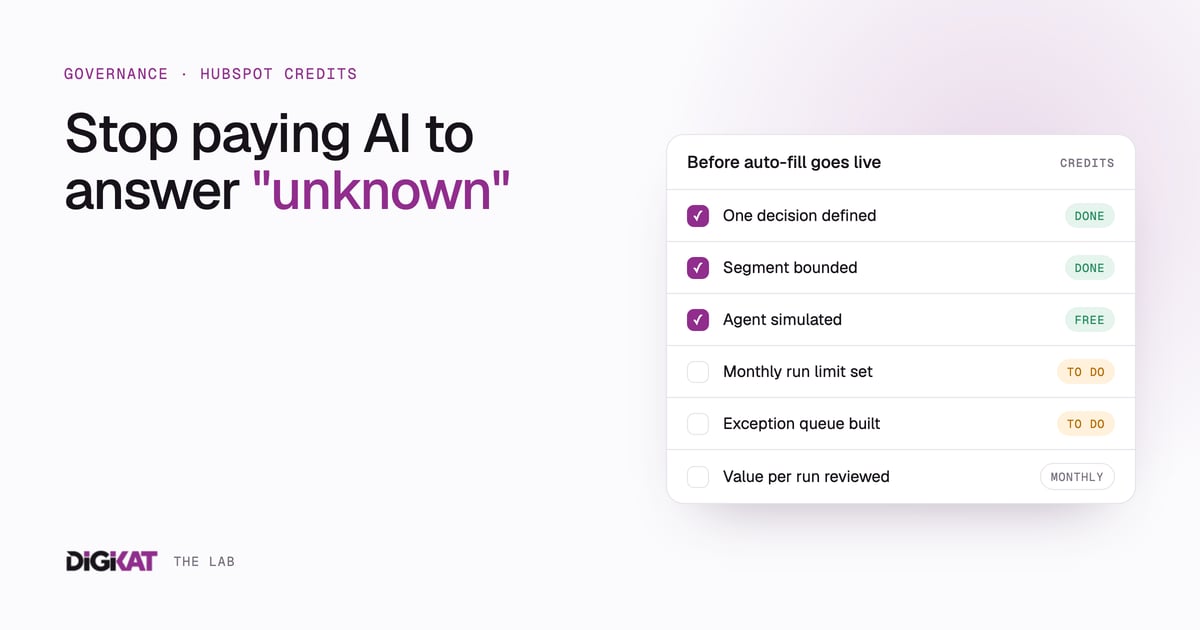
Before any agent runs automatically, use HubSpot's simulations to test it. HubSpot says simulations don't consume credits and show an estimated credit cost per run, though actual costs can differ. Then set a monthly run limit for each agent, so it stops once it reaches its cap.
A good first release might cover 20 or 50 records. You're proving the output changes a human decision before you scale it.
4. Design an exception queue
"Unknown" should be a managed outcome. Create a view or task queue that separates:
- missing CRM data;
- unclear public information;
- conflicting sources;
- low-confidence outputs; and
- cases that need human judgement.
A bounded agent can organise, extract, classify, route, notify and prepare. People approve anything with commercial, privacy or clinical consequences.
5. Measure value per run
Credits are an input. They're a poor measure of success. Review a short scorecard each month:
- credits used by each agent or smart property;
- the share of outputs people actually used;
- the share of "unknown" or exception results;
- review time saved;
- decisions or processes improved; and
- any change in conversion, response or resolution.
If nobody uses the output, pause the automation, even if it's technically accurate. And keep the scorecard small. I've seen plenty of dashboards that look busy and change nothing.
Implementation checklist
- List every credit-consuming agent, smart property and workflow action.
- Name a business owner and a technical owner for each.
- Document the decision, eligible segment and minimum input data.
- Test on a small record set before turning on automatic fills.
- Run simulations and set monthly run limits for agents.
- Check usage alerts, overage settings and spend limits at account level.
- Create an exception queue for missing, unclear and low-confidence results.
- Review output quality and credit use monthly.
- Keep irreversible or high-impact actions behind human approval.
- Retire automations that don't improve a useful outcome.
One record, bounded agents, people approve
The best HubSpot AI setup is the one that makes a defined process faster and more reliable without hiding cost, context or accountability. The number of agents is beside the point.
For healthcare teams, those boundaries matter even more. Administrative agents can organise, extract, route, notify and prepare. They shouldn't diagnose, interpret results or prescribe. Clinicians keep clinical decisions. Your CRM will show you quickly whether you've held that line, as I wrote in Your CRM Is a Mirror.
If your AI usage in HubSpot has grown faster than the rules around it, see how we approach AI safety and governance and start with one automation worth reviewing.