When a message leaves your business under a real person's name, "the workflow sent it" isn't much of an excuse.
HubSpot sequences and workflows save hours of repetitive work. They also create a control problem. A message can be correctly set up, properly scheduled and still be wrong. It goes out after the prospect has already replied. Or after they've asked you to stop. Or before anyone has read the wording.
Here's how I set up approval-gated outreach, so automation and AI can research, prepare and queue the work while a person keeps the final say on who gets contacted.
Why this matters more for one-to-one email
HubSpot's guide to creating and editing sequences explains that sequence emails go through the connected individual work email address, rather than HubSpot's marketing email servers. To the recipient, it's a message from your salesperson or adviser. It carries their name and their reputation.
So the risk goes beyond deliverability. Badly controlled automation creates duplicate messages, irrelevant follow-ups, missed opt-outs and awkward timing right after a real conversation.
HubSpot gives you useful building blocks: business-day sending and send windows on sequences, automatic unenrolment when someone replies or books a meeting, manual unenrolment, and workflow unenrolment and suppression settings. HubSpot's built-in approvals cover things like marketing content, quotes and deal stages on certain tiers. They aren't designed as a sign-off step for each sequence email. That gate is something you design into your process.
The pattern: prepare automatically, approve deliberately
Four principles sit behind every outreach build I do:
- One record. The contact, company, deal, replies, tasks and consent status all live together.
- Easy self-service. Prospects can reply, book a time, update preferences or opt out without friction.
- Bounded agents. AI can research, summarise, draft and recommend, with tightly limited access and actions.
- People approve. A named person owns the decision to send.
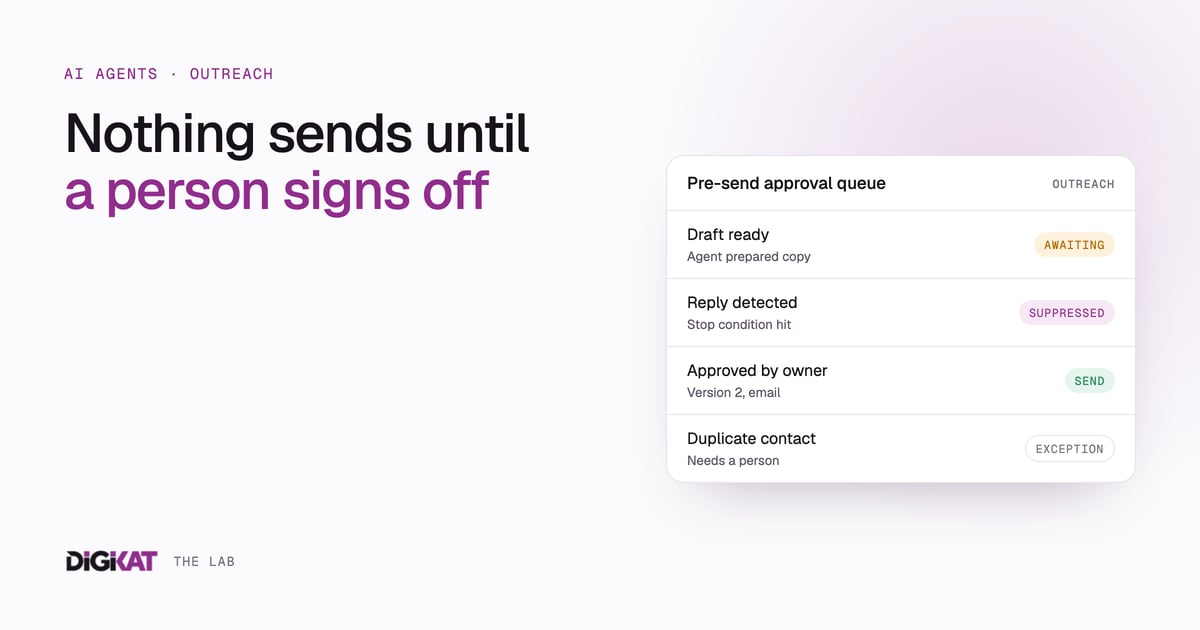
In practice: workflow detects, agent prepares, person approves, workflow acts.
Seven controls for safer outreach
1. Separate "draft ready" from "sent"
A draft is not a send. Use explicit status values such as Researching, Draft ready, Awaiting approval, Initial sent, Follow-up due, Replied, Suppressed and Closed with no response.
Only move a record to Initial sent when HubSpot activity or the mailbox confirms the email actually went. Otherwise the queue quietly moves forward because someone created a task or generated some copy.
2. Make approval a real event
Record who approved, when, which channel and which version of the message. For low volumes, a completed HubSpot task linked to the contact, company and deal works fine. Higher-volume teams might use a custom object or a separate approval step that sits before enrolment.
"Approved" should be a deliberate change of state. A deadline passing doesn't count.
3. Put stop conditions before timing rules
Before you worry about the best send day, check whether the contact has replied, opted out, bounced, asked not to be contacted, entered an active deal or already has a better open task.
By default, HubSpot unenrols a contact from a sequence when they reply or book a meeting, and an unsubscribe or bounce also ends enrolment. HubSpot's unenrolment guide covers the details, including the manual options. Build your other stop conditions on top of those defaults.
4. Use a pre-send exception queue
Send questionable records to a human queue instead of letting them roll on. Good exception reasons include:
- no verified recipient;
- no confirmed initial send;
- a reply has been detected;
- an opt-out or complaint has been detected;
- the message would send outside the approved window;
- the deal stage has changed;
- a duplicate contact or company exists; or
- personalisation confidence is below your agreed threshold.
In my experience, a good exception queue is worth more than another layer of generated copy.
5. Give every sequence a kill switch
You need a fast way to stop future messages without editing several branches. A suppression list, a "Pause outreach" property or a workflow that unenrols contacts all work. Note that workflow-driven sequence unenrolment depends on your HubSpot tier, so check yours.
Test the kill switch on a test record and write down who's allowed to use it.
6. Keep agents on preparation
An AI agent can do valuable work before anything sends. It can compare the CRM with public research, spot a real problem worth mentioning, draft a short message, flag missing fields and recommend a next step.
Don't give it open authority to pick recipients, override consent, enrol big lists or send under a person's name without the approval step. Its tool permissions should match that boundary.
7. Review outcomes, not activity
Watch replies, qualified conversations, opt-outs, complaints, bad personalisation, duplicate sends and how often people had to step in. A sequence with high volume and low relevance is fast, and that's all it is.
Implementation checklist
- Map every enrolment source, sequence and sending mailbox.
- Define the status values that separate drafts, approvals and confirmed sends.
- Set reply, opt-out, bounce, open deal and duplicate stop conditions.
- Create one visible pre-send exception queue.
- Limit AI and workflow permissions to their approved job.
- Set sending windows in the correct account time zone.
- Test the approval gate, the kill switch and reply detection.
- Assign an owner for daily queue review and weekly exception review.
- Keep an audit trail of message version, approver and send evidence.
Where human judgement belongs
Speed is still the point. I've seen what happens when a business takes days to respond to an enquiry, and wrote about it in the honest truth about replacing a hire with an AI workflow. Approval gates are there to put a person exactly where they protect revenue, trust and your name.
HubSpot holds the context. Workflows handle the fixed rules. Agents do the research and drafting. People approve the commercial decision. Then the system sends and records what happened. It's the same approach we use for our own AI at DigiKat.
The pattern works well beyond prospecting: client onboarding, service recovery, document requests and telehealth administration. In healthcare, agents can organise, route, notify and prepare, and clinicians keep every clinical decision.
Consent, privacy and spam rules still apply to every message, so check your obligations with a qualified adviser. If you want help building outreach where AI prepares and people approve, see how we design AI agents for HubSpot.