This is general operational guidance, not legal, clinical or regulatory advice.
A connected app wants more access to your HubSpot portal. A screen lists the permissions. There's a big button to approve. Most people click it.
I get why. The integration is useful, the vendor seems reputable and nobody wants to be the person who broke the sync. But every scope you approve is another door into your CRM. In plenty of Australian businesses, that CRM holds health enquiries, financial details or staff information.
Here's the review I run before approving a new scope. It takes less time than you'd think.
What a scope actually is
A scope gives an app access to a defined set of HubSpot APIs and data. HubSpot's developer documentation on scopes describes three types:
- Required scopes, which the app needs before it can install at all.
- Conditionally required scopes, used for features that only apply to some accounts or tiers.
- Optional scopes, which you can choose to grant or skip.
Optional scopes are where the judgement sits. The vendor is offering extra capability. You're allowed to say no until you need it.
Why this is a privacy question too
Under APP 11, organisations covered by the Privacy Act must take reasonable steps to protect personal information from misuse, interference and loss, and from unauthorised access, modification or disclosure. The OAIC's APP 11 guidelines explain what that looks like in practice. APP 3 limits collection to what's reasonably necessary for your functions or activities, as set out in the APP 3 guidelines.
An app with broader access than its job needs is a bigger target, and a bigger mess if something goes wrong. Least privilege is good security. It's also much easier to explain to a client, a board or a regulator.
Plan for what's coming too. From 10 December 2026, organisations that use personal information in automated decisions that could significantly affect someone's rights or interests will need to say so in their privacy policy. The OAIC is consulting on guidance for this obligation. If an app or AI agent makes decisions with your CRM data, you'll want to know exactly what it can touch.
Seven questions before you approve
1. What job needs this permission?
Write it as one sentence. "Create a support ticket when a signed-in customer reports a fault." If you can't write the sentence, the scope isn't ready for approval.
2. Where's the source of truth?
Decide which record holds the trusted customer, patient or client context. I prefer one governed record over copies spread across five tools. The app should read and update the fewest fields it needs. Your CRM tends to reflect how you run the business, which I wrote about in Your CRM Is a Mirror.
3. Read, write, export or delete?
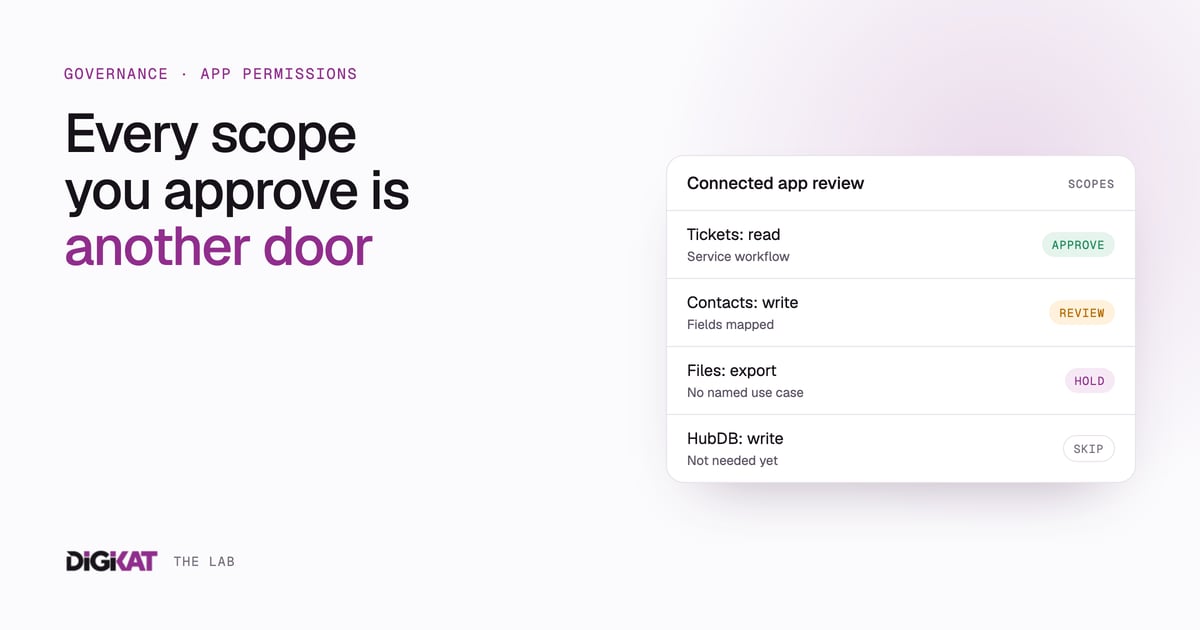
These carry very different risks. Reading a ticket subject is a long way from downloading your file library or deleting records. Judge the scope by the worst thing it allows, and ignore the happy path for a moment.
4. Does it need every object?
Assess each scope on its own. Tickets might be justified for a service integration. Files, custom objects or HubDB might not be needed yet. Approve the smallest set that works and expand when a real use case turns up.
5. Where does a person approve?
If the app or an agent can take consequential actions, define where a human signs off. Commercial commitments, sensitive disclosures and anything hard to reverse should need a person.
6. What evidence will you keep?
Record the app owner, the purpose, the scopes granted, the data touched, how you tested it and the next review date. A one-page register is enough. It turns "we trust the vendor" into a control someone can check.
7. How will you switch it off?
Decide who can disconnect the app, what happens to work in progress, whether the vendor keeps copies of your data and how you'll confirm access has ended. HubSpot's connected apps settings show what's installed in your account, and its guide to managing access to apps covers the admin controls available to you.
A simple approval register
For each app, capture six things before you approve:
- Purpose: one named workflow and a measurable outcome. Owned by the process owner.
- Data access: the objects and fields mapped to that workflow. Owned by the HubSpot admin.
- Action boundary: read, write, export and delete rights written down. Owned by the technical lead.
- Human control: the approval point and exception path. Owned by the operations lead.
- Security: vendor, authentication, logging and revocation checked. Owned by the privacy or security lead.
- Review: a named owner and the next review date. Owned by a Super Admin.
AI agents raise the stakes
An agent with broad access can do more, faster, with less oversight. That's the whole appeal, and the whole risk. Start with one job and one record. A service agent might:
- answer from approved knowledge;
- read the signed-in customer's own record;
- create a support ticket with structured context;
- notify the right team; and
- prepare a next step for a person to approve.
It shouldn't browse unrelated records, export files or make commercial decisions just because the permissions technically allow it. This is the same thinking behind the human approval rules we use for our own AI at DigiKat.
Healthcare needs a tighter line
For telehealth providers, administrative automation can organise intake, collect documents, notify staff and prepare a case for review. It must not diagnose, interpret results or prescribe. Clinicians make the clinical decisions.
Your permissions should match that line. Access to scheduling or service tickets may support an admin workflow. Access to clinical information needs a documented purpose, stronger controls and a named owner.
A 90-minute review you can run this week
- List every connected app and its business owner.
- Identify new or changed scopes.
- Map each scope to one current workflow.
- Remove "just in case" permissions.
- Confirm the source-of-truth record.
- Define the human approval and exception path.
- Test with synthetic or non-sensitive data first.
- Check logging, monitoring and how you'd revoke access.
- Set a quarterly review date.
The question to ask
"Can the app do this?" is easy to answer. The more useful question is "what's the smallest access that makes this process better?" Ask it every time and your CRM stays something you can explain. If you'd like a second set of eyes on your connected apps and AI permissions, see how we approach AI safety and governance.