A year ago, clients asked me what an AI agent could do. Now the first question in almost every meeting is different: "Where does our data go when an agent reads it?"
It's the right question. An agent that drafts a follow-up email has to read the contact record, the deal notes and sometimes the last few emails. That text gets sent to a model. So where does the model run, who can see the request, and what happens to it afterwards?
This post is my plain answer for how we run agents at DigiKat, and the questions I'd ask any vendor, including us.
What "processed in Australia" actually means
Our client agents use Claude, Anthropic's model, through Amazon Bedrock. Bedrock is AWS's service for calling AI models inside an AWS account. There are three ways a Bedrock call can be routed, and they matter a lot for residency.
1. In-region calls in Sydney
The simplest setup calls the model directly in the AWS Asia Pacific (Sydney) region, ap-southeast-2. The request is handled in that region. The catch is model availability: not every model is offered in-region in every AWS region, and newer models are often served only through inference profiles.
2. The au. geographic inference profile
AWS also offers geographic cross-region inference profiles. These spread load across a fixed set of regions within one geography. The Australian profile uses an au. prefix. AWS's launch post explains that requests from Sydney are routed to either Sydney or Melbourne, and requests from Melbourne go to either of those two regions. Traffic stays on the AWS network.
A few honest caveats:
- The AU profile covers Sydney and Melbourne only. AWS later added Auckland as a source region, and AWS says that didn't change where Australian-origin requests are routed. Still, read the routing table for the exact model you use.
- Not every model is in every profile. The AU profile launched with Claude Sonnet 4.5 and Haiku 4.5, and AWS has added newer Claude models since. Check the model's page before you assume.
- AWS says don't trust the prefix alone. The Bedrock documentation recommends calling
GetInferenceProfile from each source region you use and checking every destination region in the response. We do that when we set up a client.
3. Why apac. and global. are different
The apac. profile routes across Asia Pacific regions, which can include regions such as Tokyo, Singapore and Seoul. The global. profile can route to any commercial AWS region in the world. Both are useful for capacity. Neither keeps processing in Australia. If a vendor tells you "we use Bedrock in Sydney" but their code calls a global. model ID, your prompts can be processed overseas.
One more detail from the Bedrock data protection page: model providers don't have access to customer prompts and completions. Anthropic doesn't see your CRM text when you call Claude through Bedrock.
Where the CRM data sits
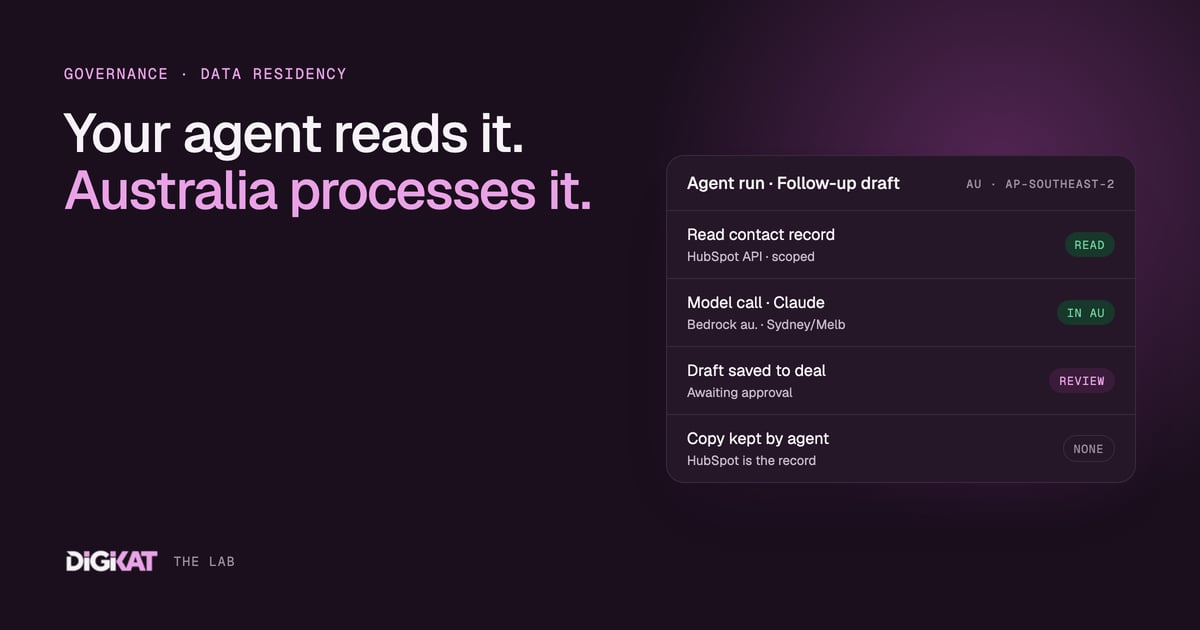
Here's the flow for a typical agent we build:
- The agent reads the record it needs from HubSpot through the API.
- It sends the relevant text to Claude on Bedrock, processed in Australia using in-region Sydney or the
au. profile.
- The draft goes back onto the HubSpot record as a note, task or email draft.
- A person reviews and approves it before anything is sent or changed.
- The agent keeps no copy. HubSpot stays the system of record.
That last point is a design choice. An agent that quietly builds its own database of your customers is a second CRM you didn't ask for, and a second thing to secure.
I'm careful with one claim, though. I won't tell you "your data never leaves Australia," because the model call is only one part of the picture. Your CRM is the other part. HubSpot offers regional data hosting, including Australia, and the location is generally set when the account is created. HubSpot's data hosting FAQ also notes some processing can happen outside the hosting region. So check where your CRM is hosted. In HubSpot, it's under Settings, Privacy & Consent, Data Hosting.
AI usage is a real running cost
Every model call costs money. A busy agent reading long email threads costs more than one tagging new leads. That cost is real, and it varies with volume.
So we keep it visible. On our pricing page, AI usage is charged separately from the managed monthly fee. You can see what the agents are using, and the management fee doesn't hide a model bill inside it.
Why we run agents in our own managed AWS environment
We run client agents in DigiKat's managed AWS environment in Sydney. If a client wants the workload in their own AWS account, we can deploy there instead. Larger organisations and health businesses often prefer that, because it sits under their own security controls and billing.
We no longer install local AI hardware for clients. One managed platform is easier to secure, update and monitor.
In practice that means:
- Model access is locked to the regions and profiles we've approved.
- Updates and security patches roll out once, across every client.
- Logging and monitoring are in one place, so when something looks odd we see it.
- Access to each client's HubSpot uses scoped permissions, limited to what the agent needs.
If you've read our honest write-up on replacing a hire with an AI workflow, you'll know the hard part is rarely the model. It's the plumbing around it.
Six questions to ask any AI vendor about data residency
- Which model and which provider? Get the actual model ID, including the prefix.
- Which regions can a request be processed in? Ask for every destination region, as well as where the app itself is hosted.
- Do you keep a copy of our data? Prompts, outputs, embeddings, logs. Where, for how long, and who can read them?
- Can the model provider see our data? Ask how this is handled in the contract.
- Whose account does it run in? Yours, theirs, or a shared multi-tenant platform?
- What does a person approve before anything changes? Drafts, updates, sends. Get it in writing.
If a vendor can't answer the first two quickly, that tells you something.
The Privacy Act context
Two parts of the Privacy Act matter here. I'll keep them short.
APP 8, cross-border disclosure. Before you disclose personal information to an overseas recipient, you must take reasonable steps to make sure they handle it in line with the APPs. Under section 16C you can stay accountable for what they do. The OAIC's APP 8 guidelines also explain when sending data to a cloud provider can count as a "use" instead, depending on contract terms and how much control you keep. Keeping model processing in Australia removes a lot of that analysis for the model call.
Automated decision transparency, from 10 December 2026. If a computer program makes, or substantially and directly informs, a decision that could significantly affect someone's rights or interests, and it uses their personal information, your privacy policy must describe it. That includes the kinds of personal information used and the kinds of decisions involved. The OAIC has published guidance and updated its APP 1 guidelines. A human approval step helps, but it doesn't remove the need to check your policy. For health businesses, our post on where automation ends in telehealth covers the clinical side.
This is general guidance, not legal advice. Talk to your privacy adviser about your own obligations.
The short version
Know which model runs, where it's processed, where your CRM is hosted, and who approves the output. Write those four answers down. Most residency conversations get much easier once you have them.
If you want to see how we set up guardrails, approvals and regions for client agents, our AI safety page walks through it. Bring your vendor questions. I'm happy to answer them for our setup too.