Recruitment runs two sales pipelines at once, and most CRMs only handle one of them properly. You're selling roles to candidates and candidates to clients, often on the same day and usually from the car park between meetings. Labour hire adds a third layer: who's available, who's compliant and who's on which site on Monday. That's a lot of moving parts. It's also a lot of structured, repeatable follow-up that an agent can work, if HubSpot is set up to show it clearly.
Two pipelines, one database
The mistake I see most often is recruiters forcing everything into a single deals pipeline. Candidates end up as notes on a deal, or deals end up as properties on a contact, and nobody can tell what stage anything is at. In HubSpot we separate the two flows and connect them with associations.
The client side
Client companies sit as companies, with hiring managers as contacts. Each vacancy or job order is its own record, usually a custom object called Job, moving through stages such as brief taken, shortlist sent, interviews, offer and placed. A deal tracks the revenue, whether that's a permanent fee or the margin on a contract.
The candidate side
Candidates are contacts with their own lifecycle: new, screened, submitted, interviewing, placed and, for contractors and labour hire workers, on assignment. A Placement record, associated to the candidate, the job and the client, ties the two sides together. For labour hire, that's also where start dates, sites and rates live.
Compliance on the record
Licences, tickets, police checks and right-to-work documents belong on the candidate record as properties with expiry dates, not in a folder someone has to remember to check. Once they're there, an agent can watch them.
None of this works if recruiters won't use it. Keep the screens simple and the clicks few. Our post on the 3-click rule for CRM adoption explains why that matters more than any feature.
What an agent can work on each pipeline
With the structure in place, an agent has a clear map. It knows what a job is, which candidates are attached, which client owns it and what stage everything is at. Here's the kind of work we'd give it.
Client pipeline
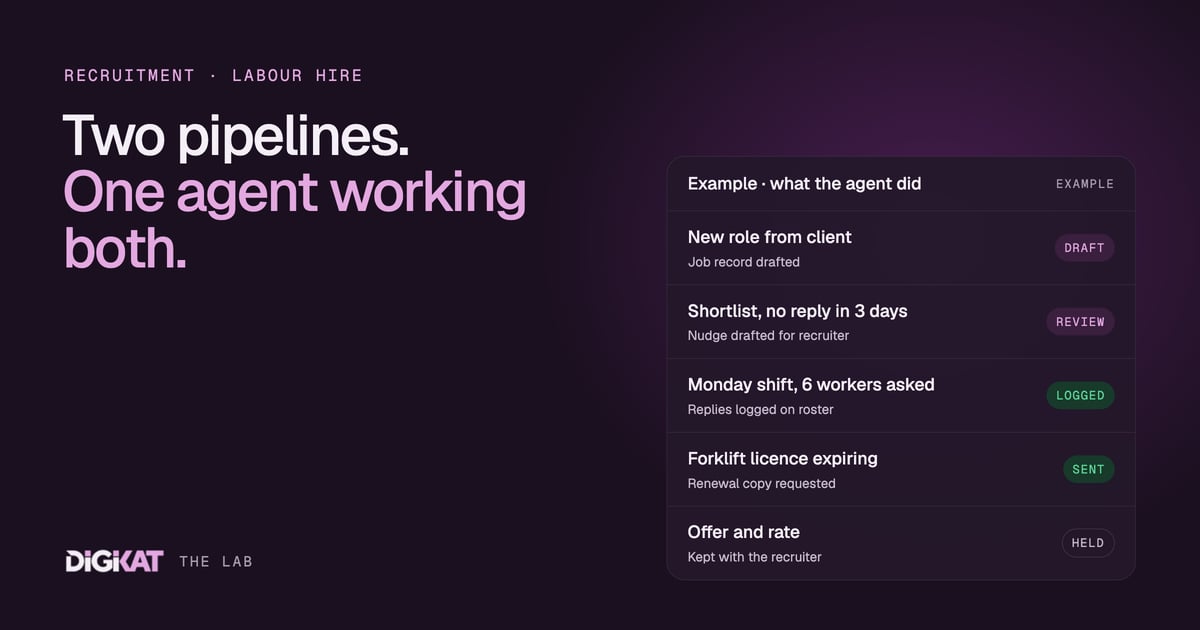
- Brief intake: a hiring manager emails a new role, and the agent drafts the Job record with the details filled in for the recruiter to check.
- Feedback chasing: a shortlist went out three days ago with no response, so the agent drafts a polite nudge for the recruiter to send.
- Repeat business: a placement passes its first month, so the agent drafts a check-in and asks whether there are other roles coming.
Candidate pipeline
- Screening intake: the agent collects the standard answers (availability, location, licences, salary expectations) and logs them on the record.
- Availability checks: for labour hire, the agent asks a list of suitable workers whether they can do a shift and records who said yes, so the coordinator fills the roster from replies instead of ringing round.
- Compliance chasing: a forklift licence expires next month, so the agent asks the worker for the renewed copy. This is the same pattern as our document-chasing agent, pointed at candidates instead of clients.
- Interview reminders: time, address, who to ask for and what to bring, sent the day before.
Some of this is plain workflow, not an agent. A reminder the day before an interview doesn't need judgement. We use workflows where the rules are fixed and agents where the input is messy, like a reply that says "can do Tuesday but not Wednesday, and I've got a new ticket". The five workflows we set up first are a good place to see where that line sits.
Where recruiters stay in charge
Recruitment is a people business, and some calls must stay with people. The agent never decides who goes on a shortlist, never ranks candidates on anything other than the criteria the recruiter sets and never makes or negotiates an offer. Rates, margins and fees stay with a person, because money always does.
Candidate information is personal information, so we're careful about what the agent can see and what it sends. It works inside HubSpot, it uses approved templates for anything that goes to a client, and a recruiter approves every submission. If you have specific privacy obligations, check them with your adviser before you switch anything on.
Why the data layer decides whether this works
Recruitment databases get messy fast. The same candidate applies through three job boards and becomes three contacts. A client contact moves companies and their old email sits on the wrong record. An agent working with that data will chase the wrong person, or chase the right person three times.
That's not a model problem, it's a data problem. We wrote about this in why most AI agents fail, and it's a big part of why Gartner predicts over 40% of agentic AI projects will be cancelled by the end of 2027. So before any agent goes near a recruitment database, we merge duplicates, agree on one record per person and make sure the job, placement and candidate records are properly associated.
A sensible first agent for a recruitment business
We follow the same four steps every time: Context, Action, Coordination, Result.
- Context: check the data, pick one job (labour hire availability checks or compliance chasing are good candidates), agree what done means and measure what it costs today. For example, how many hours a week your coordinators spend ringing workers about shifts.
- Action: HubSpot's own agents first, custom agents connected to HubSpot only where they stop. We test on real past cases, write the hand-off rules down and start in drafting mode.
- Coordination: people approve, agents act. Once 95% of the agent's work has been approved unchanged for two weeks, it earns more freedom. Offers, rates and anything contractual stay with a person.
- Result: a monthly scorecard showing what the agent did, what it saved, what it cost and the net return.
You can read more about the agents we build on HubSpot on our HubSpot agents page.
Let your recruiters get back to recruiting
If your consultants spend more time chasing tickets and feedback than talking to people, we'd like to help. Book an AI Readiness Audit to see whether your HubSpot is ready for a recruitment agent, or head to Build my solution and we'll map your candidate and client pipelines together.