People ask me why DigiKat builds every agent on HubSpot when there are a hundred shiny AI tools out there. My answer is always the same. An agent is only as good as the map it's given, and HubSpot is the best map most businesses already own.
This post explains that choice properly: why agents fail when they're fed messy context, what HubSpot's structure gives them instead, and how one well-kept record lets six agents work together as a team.
Agents don't fail on intelligence. They fail on context.
The models are good now. Give one a clear question and the right facts and it will draft a sensible reply, summarise a history or pick the next step. The trouble starts when the facts are scattered. The customer's details are in the CRM, the job status is in a spreadsheet, the invoice is in the accounting system and the last conversation is in someone's inbox.
A person stitches that together from memory. An agent can't. It works with what it can see, and if what it can see is incomplete or contradictory, it gives a confident wrong answer. That's a big part of why so many projects stall. Gartner predicts over 40% of agentic AI projects will be cancelled by the end of 2027. In my experience, the ones that survive have one thing in common: they started with clean, structured data.
We've set out the data checks we run before any agent goes live in bad context in, bad agent out. This post is about the layer those checks protect.
HubSpot is the structured data layer
HubSpot is three things stacked together, and an agent needs all three.
- Objects: the types of things your business keeps records about. Contacts, companies, deals, tickets and invoices as standard, plus objects built for particular industries, such as the Services object for service businesses and the Listings object for real estate, and custom objects for anything else.
- Pipelines: the stages each record moves through. Sales pipelines, service pipelines, project pipelines, ticket pipelines. Each stage tells an agent what's true right now and what should happen next.
- Associations: the links between records. This contact works at this company, owns this deal, raised this ticket and has this invoice outstanding.
Put those together and an agent has a structured flow to follow. It knows what kind of record it's looking at, where that record is up to, and how to fetch everything connected to it. It doesn't have to guess which spreadsheet holds the truth, because there's one place to look.
HubSpot has leaned into this itself. Its agentic customer platform announcement is built on the same idea: agents working from unified customer data. That's the bet we made early, and it's why we start with HubSpot's own agents wherever they fit and build custom agents connected to HubSpot only where they stop.
One record, six agents
Our management agent team has six members. Each one has its own patch, but they all read and write the same HubSpot records.
- Sales agent: runs the sales pipelines. Fast lead replies, stalled deal nudges, follow-up drafts. We covered it in the Sales agent.
- Service agent: runs the service and delivery pipelines. Onboarding steps, project stage moves, chasing client inputs.
- Support agent: runs the help desk, website chat, and chat inside patient and membership portals.
- Marketing agent: segments, nurture and campaign follow-up.
- Content agent: works out what content is needed, based on the questions and gaps it sees in the CRM.
- Knowledge base agent: keeps the approved answers and articles. The others ask it what to send. We call it the librarian every other agent asks first.
Because they share one record, they can hand work to each other the way good colleagues do. No re-keying, no forwarding long email threads, no "can you tell me the history on this one?"
What a hand-off looks like
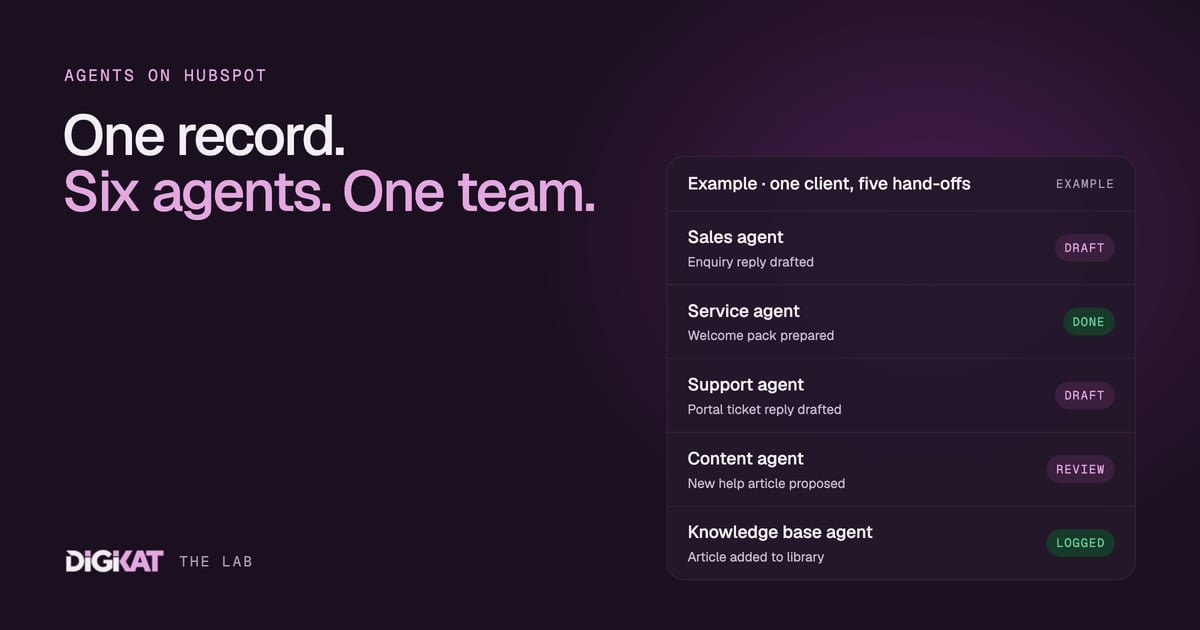
Here's an illustrative journey for a service business, end to end.
- A prospect fills in an enquiry form. The Sales agent checks the contact and company, creates a deal in the right pipeline, asks the Knowledge base agent what to send at this stage, and drafts a reply for a person to approve.
- The deal is won. The Service agent picks up the associated onboarding record, drafts the welcome pack and starts tracking the inputs it needs from the client.
- A month in, the client asks a how-to question in their portal. The Support agent opens a ticket that's already associated to the contact, company and service, so it knows exactly what was delivered.
- That same question has come up from five clients this month. The Content agent spots the pattern and proposes a help article. Once a person approves it, the Knowledge base agent adds it to the approved library.
- The Marketing agent sees the client has been live for 90 days with no open issues and adds them to a referral nurture segment.
Not one of those steps needed an agent to guess. Each read the record, followed its pipeline and used the associations to fetch what it needed. That's the whole point.
People approve, agents act
None of this runs unsupervised on day one. We use the same four-step method on every build, and the language is deliberately plain:
- Context: check the data, pick one job, agree what done means, and measure what that job costs today.
- Action: HubSpot's own agents first, custom only where they stop. Tested on real past cases, with written hand-off rules, and every agent starts by drafting.
- Coordination: people approve, agents act. An agent earns more freedom once 95% of its work has been approved unchanged for two weeks. Money, signatures, and clinical or legal advice always stay with a person.
- Result: a monthly scorecard per agent: what it did, what it saved, what it cost and the net return.
The structure HubSpot gives us is what makes the Coordination step workable. When every draft is tied to a record, a reviewer can see exactly why the agent suggested it, and approve or correct it in seconds. You can see the full team on our agents page.
If you already run your business on HubSpot, you're closer to a working agent team than you think. Tell us the one job you'd hand over first and we'll map it against your data. Start with Build my solution, or book an AI Readiness Audit if you'd like us to check your HubSpot first.