Building an agent is the part everyone pictures. Running it is the part that decides whether it's still useful in six months.
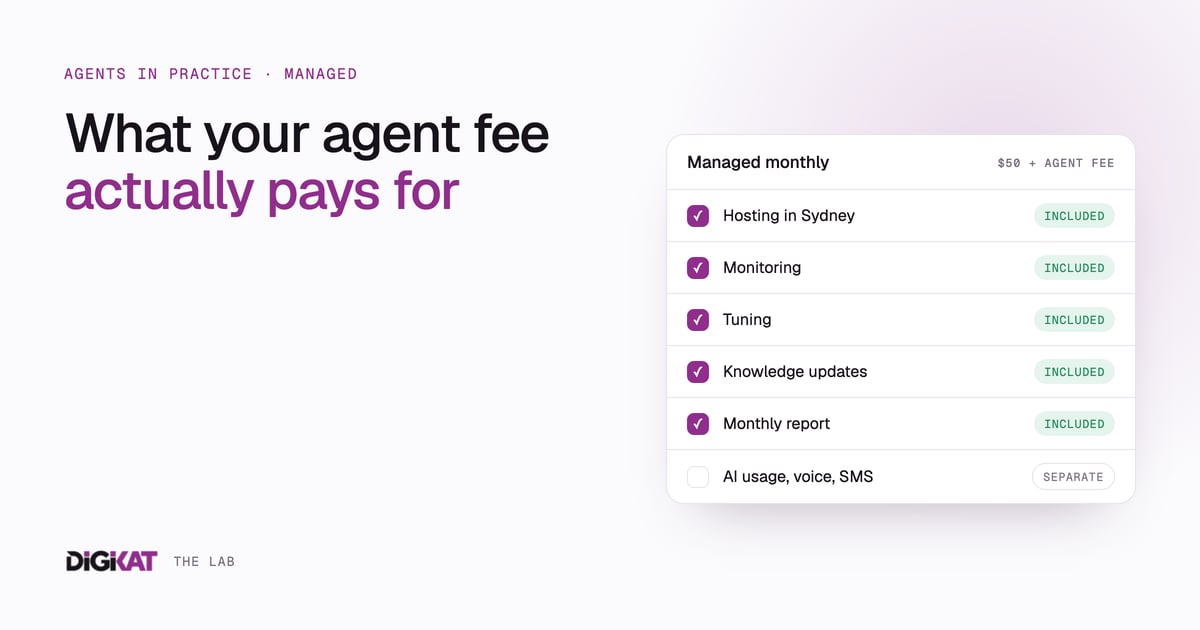
An agent isn't a website you launch and leave. Your prices change. Your team changes. Customers ask questions nobody predicted. An API that worked yesterday times out today. Somebody has to notice, and somebody has to fix it. That's what our managed monthly fee pays for.
Here's what's in it, what isn't, and why.
How the monthly fee is built
There are two parts.
- The managed agents retainer: $50 a month for each website or portal your agents run on.
- Each agent's monthly fee: set by its level. L1 is $50, L2 is $100, L3 is $175, L4 is $300, and L5 starts from $500.
So a portal with one L1 agent is $100 a month. A website with an L2 intake agent and an L2 booking agent is $250 a month. All prices are AUD, ex GST, and they're on our pricing page.
The level comes from the same six factors we use to price the build: channels, what the agent is allowed to do, how many systems it connects to, its logic, the risk and the volume. A riskier, busier agent needs more watching, so it costs more to run.
What it pays for
Hosting
Your agents run in our managed AWS environment in Sydney. They call Claude through Amazon Bedrock, with processing kept in Australia. If you'd rather your agents run in your own AWS account, that's an option too. Either way, the agents read and write your HubSpot record and keep no separate copy of your customer data.
Monitoring
We watch for the failures that don't announce themselves. In the lead-response system we built for a financial advisory firm, an API timeout went unnoticed for four hours. Nothing crashed. Leads just quietly stopped getting answered. The fix was an alert if any lead sat unanswered for more than an hour during business hours.
That lesson shapes how we monitor every agent. We check that the work is getting done, as well as whether the system is up. It's the same idea as designing workflows around exceptions: "sent" and "done" are different things.
Tuning
Every agent gets things slightly wrong in its first weeks. A reply that's too long. A question routed to the wrong person. A follow-up that's a bit pushy. In that advisory project, three follow-up emails in seven days left some prospects feeling hounded, so we spread them out to three touchpoints over three weeks.
That's tuning. We read the conversations, find the patterns and adjust the instructions, the routing and the limits. It's also how an agent earns more freedom over time. As the edits get smaller, more of its work can go out without a person checking every message.
Knowledge updates
An agent is only as current as the knowledge behind it. When you change a price, add a service, update a policy or retire a product, we update what the agent knows and test that it answers correctly. You tell us what changed. You don't need to learn how the agent is built.
The monthly report
Once a month you get a report on how your agents are performing: what they handled, what went to a person, and what we changed. Because every agent action is written back to HubSpot with a timestamp, you can also report on agent activity yourself, export it or switch it off.
Why AI usage is separate
AI usage is the cost of the model doing the thinking: every time an agent reads a message, looks something up or drafts a reply. It isn't in the retainer, and that's deliberate.
Usage moves with volume. A quiet month costs less than a busy one. If we rolled usage into a flat fee, we'd have to price for your busiest month and charge you for it every month. Keeping it separate means you pay for what your agents use, and you can see it.
How we keep it predictable
- We size it before the build. Volume is one of the six scoring factors, so expected volume is part of the conversation before anything is built.
- We keep agents narrow. An agent with one job and a tidy knowledge base does far less unnecessary work than one trying to do everything.
- We send the sensitive and complex work to people. In the advisory project, complex multi-topic enquiries went straight to an advisor as a task. That was better for the prospect, and it meant the agent wasn't burning effort on drafts nobody could use.
- We tune it. If an agent is doing more work than it should, that's a tuning job, and tuning is already in the retainer.
If you also use HubSpot's own AI features, the same discipline applies to HubSpot credits. Our credit governance playbook covers that side.
Voice and SMS at cost
Voice minutes and SMS messages are passed through at cost. They vary with call length, message count and how busy you are, and they can move a lot between months. Passing them through means you see the real cost and can decide whether a channel is worth it.
This mostly matters for L4 agents, such as a phone receptionist or a two-way SMS agent for reminders and confirmations. If voice or SMS is in scope, we talk about expected call and message volume before we build.
What happens if you stop
Businesses change, and sometimes an agent stops earning its place. Here's what that generally means in plain terms. The specifics for your setup are something to talk through with us.
- The agent is switched off. The managed service is what keeps an agent hosted, watched and current. We won't leave an agent running unattended. An unwatched agent is how you end up with the four-hour silence I described above.
- Your record stays in your HubSpot. Agents write to your HubSpot record and keep no separate copy, so the contacts, notes and activity history they created are already in your account.
- Usage stops with the agent. No agent running means no AI usage, voice or SMS to pay for.
Before you stop, ask whether the agent needs to go or just needs to change. Sometimes the right move is scaling an L4 back to something simpler, or retiring one agent while keeping another that's clearly working.
The short version
The build gets an agent working. The monthly fee keeps it working, keeps it accurate, and keeps a person watching what it does. It's the difference between owning a tool and having an operating model for your agents.
If you'd like to see what your setup would cost to run, the retainer, the agent levels and the calculator are all on our pricing page.