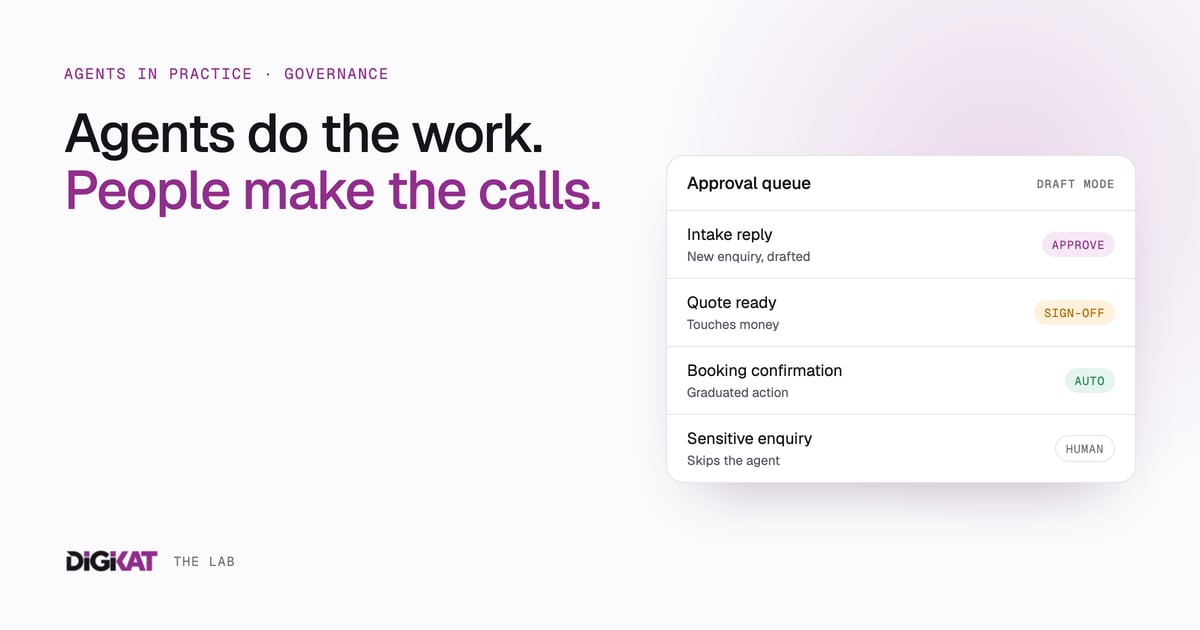
Every agent we build starts in draft mode. It does the work, then it stops and waits. A person reads what it wants to do and decides: send it, change it, or bin it.
People sometimes ask why. If the agent is good, why not let it go? Because "good" is something you prove on your own customers, with your own data, over weeks. Until then, a person stays in the loop. We have two lines we keep coming back to. "Agents do the work. People make the calls." And: "If it touches money, a person signs off."
Here's how the rule works in practice, and how it loosens as trust builds.
What draft mode means
In draft mode, an agent prepares the action and a named person approves it. In practice that looks like this:
- An intake agent reads an enquiry, fills in the HubSpot record and drafts a reply. The reply waits in a queue until someone sends it.
- A renewals agent spots that a supply is about to run out, drafts the reminder and proposes a review time. A person checks it before it goes.
- A quote agent builds the quote. A person checks the numbers and approves it before the customer sees it.
The agent still saves most of the time. Reading an enquiry, looking up the history, working out who should handle it and writing a first draft is the slow part. Approving a good draft takes seconds.
We saw this in a lead-response system we built for a financial advisory firm. Every AI draft went to an advisor with two options, Send or Edit. Nothing went out automatically. Response time still dropped from 3.5 days to 18 minutes, mostly because advisors could approve drafts quickly. Review cost almost nothing in speed, and it made the system trustworthy.
Why we start there
Mistakes in a draft cost nothing
In that same project, one draft went to a prospect who had recently lost a family member. It was technically correct and completely wrong in tone. It jumped straight to logistics. The advisor caught it in review and wrote back personally. The prospect never saw the draft.
That's the case for draft mode in one example. The mistake turned into a fix: enquiries mentioning words like "passed away", "divorce" or "illness" now skip the AI and go straight to the advisor. If the agent had been sending on its own from day one, we'd have learned that lesson on a real person at the worst possible time.
Every edit tells us something
If people keep shortening the replies, the agent is too wordy. If they keep changing who a lead goes to, the routing rule is wrong. If they rewrite the same paragraph every time, the knowledge behind it is out of date. Draft mode turns your team into reviewers, and their edits tell us exactly what to tune.
Your team stays in charge
Staff are rightly wary of software that acts in their name. When they approve every action at the start, they watch the agent get better. That's how trust and adoption happen. It's the same reason we design approval-gated outreach into HubSpot workflows.
How draft mode loosens over time
Draft mode is where an agent starts. For most actions, it isn't where the agent stays. Autonomy is earned one type of action at a time.
- Everything is a draft. In the first weeks, every outbound message and every record change is approved by a person. We read the edits and tune.
- Low-risk actions graduate. When a type of action is consistently approved without changes, such as a booking confirmation or a "we've received your documents" note, we agree with you that it can go out on its own. The agent still logs it to HubSpot.
- Exceptions stay with people. Anything unusual, sensitive or complex keeps going to a person. In the advisory project, complex multi-topic enquiries became manual tasks for the advisor, because fixing a generic draft took longer than writing from scratch.
- We keep checking. Graduated actions are still monitored and sampled. If quality slips, that action goes back to draft. Moving back is normal, and it's part of the design.
You decide when something graduates. We bring the evidence: how often drafts were sent unchanged, what the edits were, and what went wrong. Then it's your call.
What never graduates
Some decisions stay with a person however good the agent gets. Our safety page puts it plainly: money, signatures and clinical decisions stop at a named person, and approval is designed in.
- Money. Quotes, refunds, discounts and payments. If it touches money, a person signs off.
- Signatures. Anything that commits your business to an agreement.
- Clinical decisions. In telehealth, an agent can collect, organise and route information. Clinicians make the clinical decisions.
These limits are written down before go-live. Every agent has a label that says what it reads, what it may change, and what it must never do. If it isn't on the label, the agent can't do it. What an agent must never do is specified and tested before it goes anywhere near a customer.
Draft mode needs a queue
Draft mode only works if the drafts land somewhere sensible. If approvals live in someone's inbox, they get missed and the agent's speed is wasted. We put drafts and exceptions in a HubSpot queue with an owner, so approvals are visible and nothing sits for days. I wrote more about that in build the queue before the agent.
The queue also gives you a trail. Everything an agent does is written back to HubSpot with a timestamp, on the same record as the customer. When someone asks "why did we send this?", there's an answer.
The trade-off
Draft mode costs a little speed at the start. Someone has to review, and for a few weeks the agent works as a very fast assistant whose work gets checked. That's the trade, and I think it's the right one.
You get most of the time savings from day one. Your customers never see the agent's learning curve. And when an action does graduate, you have the evidence that it's ready.
If you want to see how we set limits, labels and approvals for every agent, read how our agents stay safe.