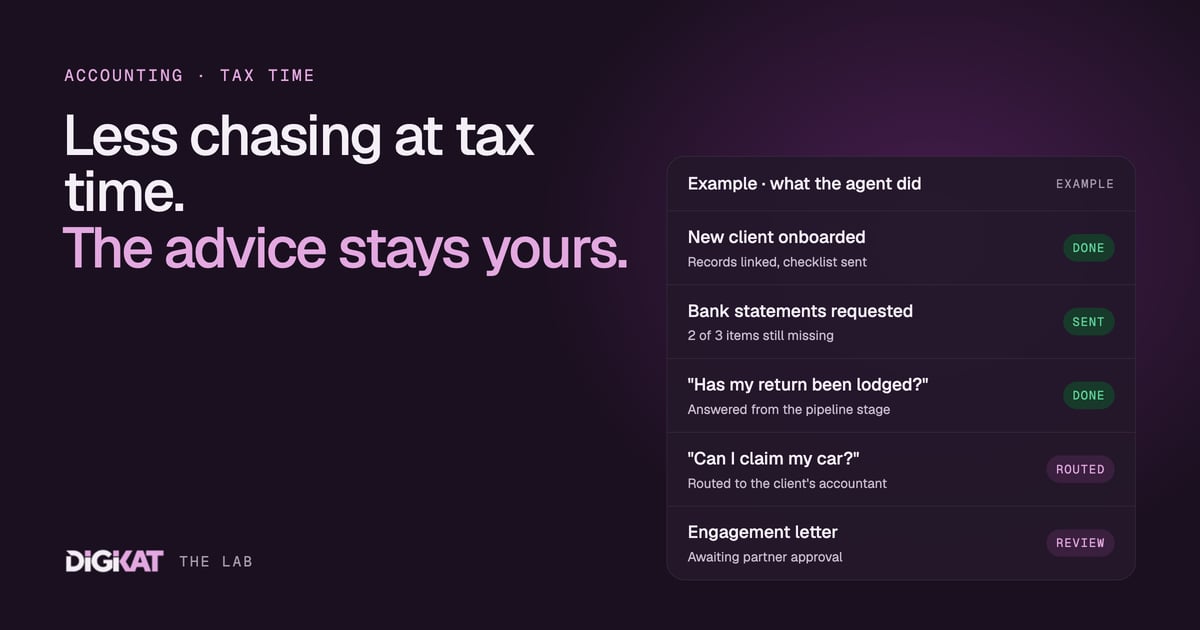
Ask any accountant what eats their week and it usually isn't the tax return. It's the three emails it took to get the bank statements, the receipt photo that arrived at 11pm, and the engagement letter that has sat unsigned since October. That's work an AI agent is genuinely good at. The advice isn't, and it shouldn't be.
I've spent a lot of time inside accounting and bookkeeping practices lately, and the pattern is the same whether it's a two-partner firm in a regional town or a busy CBD practice. The technical work is valued, priced and done well. The admin wrapped around it is invisible, unpriced and done by whoever has a spare minute. This post walks through where an agent fits in a practice, what it needs from your CRM to do the job properly, and where it stops.
If you're new to the idea, start with our plain-English guide to what an AI agent is. The short version: an agent doesn't just answer questions. It reads your records, decides the next step and takes it, within rules you set.
Where the hours actually go in a practice
When we map a practice's week, the same jobs keep turning up:
- Onboarding new clients: collecting details, ID, prior-year information, authority forms and the signed engagement letter.
- Chasing documents: bank statements, payment summaries, rental schedules, receipts and the "one more thing" on every file.
- Answering status questions: "Have you lodged it yet?" "When will I get my refund?" "Did you get my email?"
- Reminding clients about recurring work: quarterly BAS, annual returns, bookkeeping reconciliations, year-end meetings.
None of these need a qualified accountant. All of them interrupt one. That's the gap an agent fills.
Start with the data: clients, services and the jobs between them
We build agents on HubSpot for one reason: an agent is only as good as the map it's given. If your client list lives in the practice software, your job tracking lives in a spreadsheet and your client emails live in five personal inboxes, an agent has nothing reliable to work from. It will guess, and guessing is how agents get things wrong.
In HubSpot, a practice maps cleanly:
- Contacts and companies for the people and entities you act for, with the associations between them (the director, the trust, the SMSF, the spouse).
- The Services object for each recurring service you provide: the annual individual return, quarterly BAS, monthly bookkeeping, the trust return. We wrote about why HubSpot's Services object is a game-changer for service-based businesses, and practices are the textbook case.
- A service pipeline (tickets work well) for each job in each period: "FY return, John Smith" moves from documents requested, to documents received, to in preparation, to review, to lodged.
Once that structure is in place, the agent can answer a simple question for any client: what services do we provide, what job is open right now, what stage is it at, and what's missing? That's the whole game.
Three jobs we give the agent first
1. New client onboarding
A new client fills in a form on your website. The agent creates the contact and company records, links them, attaches the right services, and sends a welcome email with a clear checklist: ID, prior-year return, authority forms and the engagement letter to sign. It then tracks each item on the record and follows up on anything outstanding. The engagement letter itself is prepared and approved by a person in your practice; the agent just makes sure it doesn't get lost.
If you want to tighten this process before any automation goes near it, our guide to systemising customer onboarding is a good starting point.
2. Document chasing
Each service carries a document checklist. When a job opens, the agent requests exactly what's needed, then follows up on only what's still missing, in a friendly tone and on a sensible schedule. When everything is in, it moves the job to "ready to prepare" and tells the accountant. Nobody types "just following up" again.
3. Tax time triage
During the busy season, the agent handles the incoming questions. "Has my return been lodged?" gets an answer straight from the pipeline stage. "Did you get my documents?" gets a check against the checklist. "Can I claim my car?" gets a polite reply that a team member will come back to them, and a task lands with the right accountant, with the question and the client's file linked. HubSpot's own Breeze agents (we covered the first wave of Breeze agents when they launched) handle a lot of this out of the box. We add custom agents only where they stop.
Where the agent stops
This is the part I'm firmest about. Tax advice, accounting judgement and anything that depends on a client's circumstances stay with a qualified person. The agent never tells a client what they can claim, how to structure something or what their liability will be. Its job is intake, chasing, reminders, status questions and routing.
We set this up with what we call Coordination: people approve, agents act. Every agent starts by drafting. A team member approves each message before it goes out. An agent only earns the freedom to send on its own once 95% of its work has been approved unchanged for two weeks, and even then, money, signatures and professional advice always stay with a person. If a client asks an advice question, the agent hands it over with the context attached, so the accountant doesn't start from scratch.
Client data matters too. Good agents work on good data hygiene and clear permissions, which is why our post on data management and compliance in the age of AI still holds up.
How we'd roll it out in your practice
Gartner predicted in June 2025 that over 40% of agentic AI projects will be cancelled by the end of 2027. Most of those will fail for boring reasons: unclear goals, messy data and no way of proving value. So we keep it boring on purpose, using the same four steps every time:
- Context: check the data, pick one job (usually document chasing), agree what done means and measure what it costs you today.
- Action: HubSpot's own agents first, custom only where they stop, tested on real past jobs, with written hand-off rules. It starts by drafting.
- Coordination: your team approves, the agent acts, and freedom is earned, not assumed.
- Result: a monthly scorecard showing what the agent did, what it saved, what it cost and the net return.
For example, if your team spends an illustrative ten hours a week chasing paperwork in the busy season, that's the number the scorecard is measured against. No number, no agent.
If your practice is heading into the new year wanting a calmer tax time, let's map it properly. Book an AI Readiness Audit and we'll look at your data and pick the first job, or go straight to Build my solution if you already know what you want. You can see how our agents on HubSpot work, and read how we work before you decide.