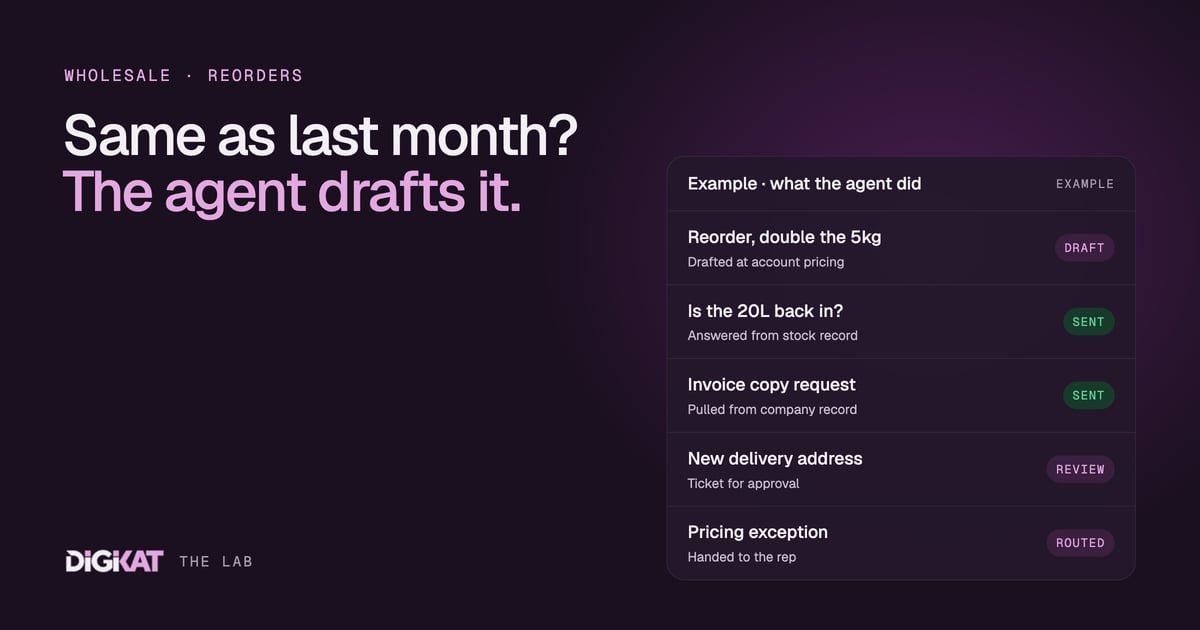
Ask a wholesale rep what fills their day and you'll rarely hear "selling". You'll hear "can you check if the 20 litre is back in stock", "can you resend last month's invoice" and "same as last time, please". It's important work. It's also work a customer portal and a well-briefed agent can handle at 11pm on a Sunday, while your rep spends Monday with the accounts that need a person.
Where the time really goes in a distribution business
I've sat with a lot of wholesale and distribution teams, and the pattern is the same whether they move hardware, food service lines, chemicals or rural supplies. A large share of inbound contact is one of five things:
- Reorders: the same products as last time, sometimes with a quantity change.
- Stock and ETA questions: "is it in?", "when's the next container?"
- Document requests: invoice copies, statements, spec sheets and safety data sheets.
- Pricing questions: "what's my price on this?", which depends on the account's tier or contract.
- Account admin: a new delivery address, a new buyer, a change to who gets the invoices.
None of these needs much judgement most of the time. They need the right record, found quickly. That's exactly the kind of work that shouldn't be sitting in a rep's inbox, and it's exactly the kind of work an agent is good at, as long as the data is there for it to read. If you're new to the idea, our plain-English guide to AI agents covers the basics.
Start with the portal, not the agent
Before any agent, we give the customer somewhere to log in. A B2B portal built on HubSpot lets a buyer see their own company record: order history, open orders, invoices and their status, their account pricing, product documents and any open support tickets. They can reorder from a previous order in a couple of clicks.
That alone removes a lot of "can you send me" emails. We've written before about building a self-service customer portal and the thinking carries straight over to distribution. If you sell through dealers or resellers rather than direct, the same approach works as a partner portal, with dealer pricing, co-op marketing material and deal registration. Our guide to building a partner portal in HubSpot walks through that version. You can see more of what we build on our portals page.
The portal matters for the agent too. It's where the agent lives. Portal chat is the natural place for a buyer to type "same as last month but double the pallets of the 5kg", and the portal already knows who they are and which company they buy for.
What the account agent does
Think of the account agent as the first person a customer reaches, day or night. Here's the work we give it.
Reorders
The agent finds the customer's last order, copies the line items, applies the change they asked for and drafts a new order or quote at their account pricing. It sends the draft back for the customer to confirm, or to the rep to check if the order is unusual. It starts by drafting, not by placing orders.
Stock questions
If stock levels are synced from your inventory or ERP system onto the product records in HubSpot, the agent can answer "is it in?" with what the data says. If the data says nothing, or the stock date is old, the agent says so and routes the question to a person. It never promises a delivery date the data doesn't support.
Documents
Invoice copies come from the invoice records attached to the company. Spec sheets and safety data sheets come from an approved library, so the agent only ever sends the current version.
Account changes and hand-offs
A new delivery address or a new buyer gets logged as a ticket for someone to approve. Anything involving money stays with a person: credit holds, pricing exceptions, payment terms, disputes and complaints. The agent's job there is to hand over cleanly, with the history attached, so the rep or your accounts team doesn't start from zero.
Why HubSpot is the layer underneath
An agent is only as good as the context it's given. In a distribution business the context is a web of related records: the company, its contacts and their roles (buyer, accounts payable, warehouse), its orders and line items, the products and their stock, the invoices and the tickets. In HubSpot those records sit in one place and they're associated with each other.
That structure is what lets an agent follow a sensible path. Customer asks about an order, so the agent goes to the contact, then their company, then the company's open orders, then the line items. It doesn't have to guess. It also means the account agent can hand work to other agents and people cleanly, because everyone is looking at the same record.
The flip side is blunt. If your stock lives in a spreadsheet someone emails round on Mondays, the agent will be confidently wrong by Wednesday. Getting the data flowing into HubSpot properly comes first. Plenty of that is plain automation, and our post on HubSpot workflows for wholesale and manufacturing covers the groundwork.
We also use HubSpot's own agents first. The Breeze Customer Agent can handle a lot of the general question layer from your knowledge base. We add custom agents, connected to HubSpot, only where HubSpot's agents stop, such as drafting a reorder against account pricing.
How we'd roll it out
We use the same four steps every time: Context, Action, Coordination, Result.
- Context: check the data (are products, prices and stock in HubSpot and current?), pick one job, agree what done means and measure what it costs today. For example, count the reorder emails in a normal week and how long each one takes.
- Action: HubSpot's own agents first, custom only where they stop. We test on real past orders before any customer sees it, write the hand-off rules down and start the agent in drafting mode.
- Coordination: people approve, agents act. An agent earns more freedom once 95% of its work has been approved unchanged for two weeks. Money, credit and signatures stay with a person.
- Result: a monthly scorecard for the agent showing what it did, what it saved, what it cost and the net return.
Reorder drafting is usually the best first job. It's frequent, it's repetitive and it's easy to check.
Ready to take reorders off your reps' plates?
If your team spends its mornings answering the same stock and reorder questions, let's map it out. Start with our AI Readiness Audit to see whether your HubSpot data is ready for an account agent, or go straight to Build my solution and we'll plan the portal and agent together. You can read how we work first if you'd like to see the process.