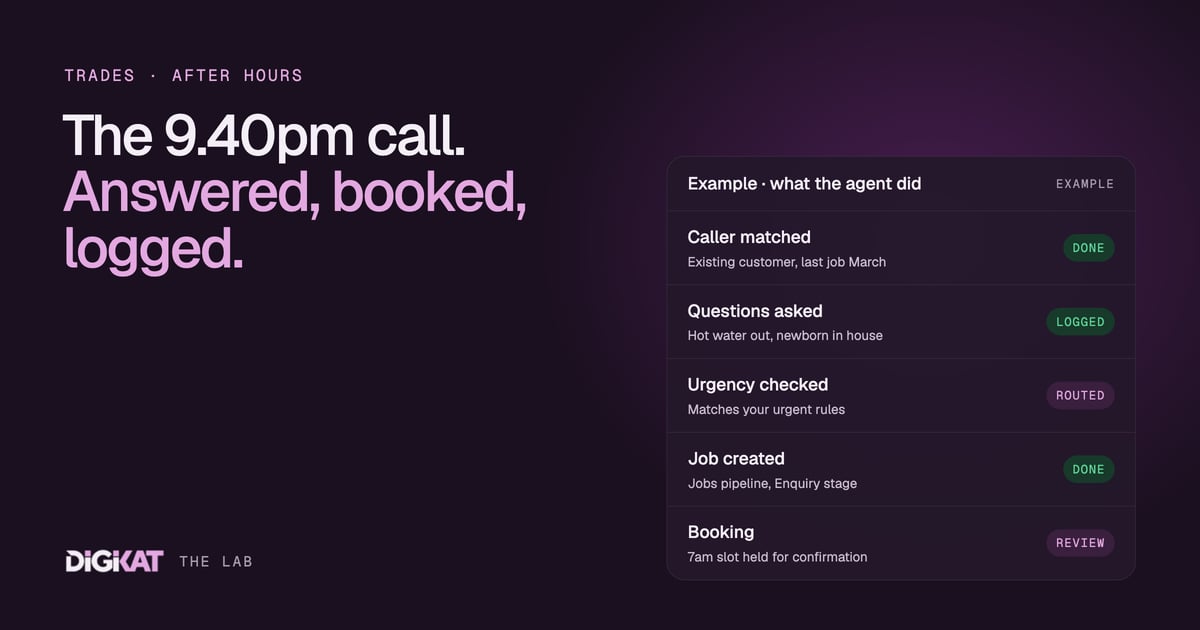
It's 9.40 on a Thursday night and a hot water system has just let go in someone's laundry. They ring three plumbers off Google. The first one who picks up gets the job, and quite possibly the next ten years of that household's work. If you're the plumber who was asleep, on the tools or having tea with the kids, you never even knew the job existed.
The missed call is the most expensive call you never see
Every trade business I talk to has the same blind spot. You know what a job is worth. You don't know how many you missed, because a missed call leaves no trace except a number in the call log that nobody rings back until the morning. By then the customer has booked someone else.
The usual fixes all have a catch. An answering service takes a message but can't book anything. Diverting to your mobile means you never get a night off. A voicemail greeting that says "leave a message and we'll get back to you" is, for an urgent job, a polite way of saying "try the next number on the list".
An after-hours receptionist agent sits in that gap. It answers the call, the website chat or the enquiry form, asks the questions you'd ask, and either books the job or gets the right person out of bed. It doesn't try to be clever. It just never lets an enquiry go cold.
What the receptionist agent actually does
Here's the flow we set up for an electrician, a plumber, an HVAC business or a security installer. The details change by trade, but the shape doesn't.
- Answers and identifies. It checks the phone number or email against HubSpot. If the caller is an existing customer, it already knows their address and their last job.
- Asks your questions. Your script, not a generic one. For a sparkie that might be: is the power out to the whole house or one circuit, and is anything hot or smelling of burning. For an alarm installer: is it a false alarm, a faulty sensor or a break-in.
- Sorts urgent from routine. Against rules you write down, not guesswork. No hot water in a house with a newborn is urgent. A dripping tap is a Monday booking.
- Creates the job. A contact, the property address, and a job in your Jobs pipeline at the Enquiry stage, with the caller's answers written into the record.
- Books or escalates. Routine work goes into an open appointment slot. Genuine emergencies trigger a text to whoever is on call, with the job summary attached.
- Confirms. The customer gets a text with what happens next and your call-out fee, so nobody is surprised when the van turns up.
When you start the day, the overnight enquiries are already sitting in the pipeline, sorted and summarised. Nobody is scrolling a call log trying to work out who rang at 11pm and what they wanted.
Why it has to sit on HubSpot, not beside it
This is the bit most people skip, and it's why a lot of "AI receptionists" end up as glorified answering machines. An agent is only as good as the information it can see and the place it can put things.
We build agents on HubSpot because it gives the agent a proper map. The job is a record in a pipeline with clear stages. The customer is a contact linked to that job. The booking is an appointment linked to both. A callback or warranty issue is a ticket linked to the original job. Because those records are associated, the agent can follow the thread: this caller had a split system installed in March, it's still under warranty, so this is a callback ticket, not a new quote.
Try doing that when the customer list is in one app, the jobs are on a whiteboard and the bookings are in someone's phone. The agent has no map, so it guesses. Guessing is how you end up double-booking a tech or charging a call-out fee on a warranty job.
It also means the receptionist can hand work on. Once the job is in the pipeline, the next step (a quote, a follow-up, a reminder the day before) can be picked up by another agent or by your office, from the same record. If you want the background on how HubSpot's own agents fit in, I wrote about Breeze agents when they launched, and about the Appointments object that makes booking slots work properly.
Where a person stays in charge
A receptionist agent is not a technician and it's not an estimator. We draw the lines clearly:
- No diagnosing over the phone. It collects the symptoms and passes them on. Your tech decides what's wrong.
- No pricing beyond what you've approved. It can quote your call-out fee and your standard after-hours rate. Anything else is "we'll confirm that on site".
- Safety goes by your script. If someone mentions a gas smell, sparking or water near a switchboard, the agent reads the safety message you've signed off and gives the emergency number you've chosen. It doesn't improvise.
- It starts by drafting. In the first weeks, bookings it makes are held for a person to confirm in the morning. Once 95% of its work has been approved unchanged for two weeks, it earns the right to book straight into the calendar.
That last rule matters. You don't hand a new apprentice the keys to the van on day one, and you shouldn't hand an agent your calendar on day one either.
How we'd set it up for you
We use the same four steps on every agent: Context, Action, Coordination, Result.
- Context: check your HubSpot data is clean enough to use, pick one job (after-hours enquiries), agree what "done" looks like, and measure what missed calls cost you today. A fortnight of call logs is usually enough.
- Action: HubSpot's own agents first, custom only where they stop. We test it against real past enquiries before it ever talks to a customer, and the hand-off rules are written down.
- Coordination: people approve, the agent acts. There are clear rules for when it wakes your on-call tech and when it waits for the morning.
- Result: a monthly scorecard showing how many enquiries it handled, how many became booked jobs, what it cost to run and the net return.
To make that concrete with an illustrative example: if you miss five after-hours calls a week and one in three would have become a $400 job, that's roughly $670 of work a week going to someone else. Your numbers will be different, which is exactly why we measure them first. If agents are new to you, start with what an AI agent actually is. And if your crew already lives on their phones, mobile CRM is the other half of this picture.
If you're tired of finding out about jobs after someone else has won them, have a look at how our after-hours receptionist agent works, then Build my solution and we'll map it to your trade, your hours and your HubSpot. Not sure your data is ready? Start with an AI Readiness Audit.