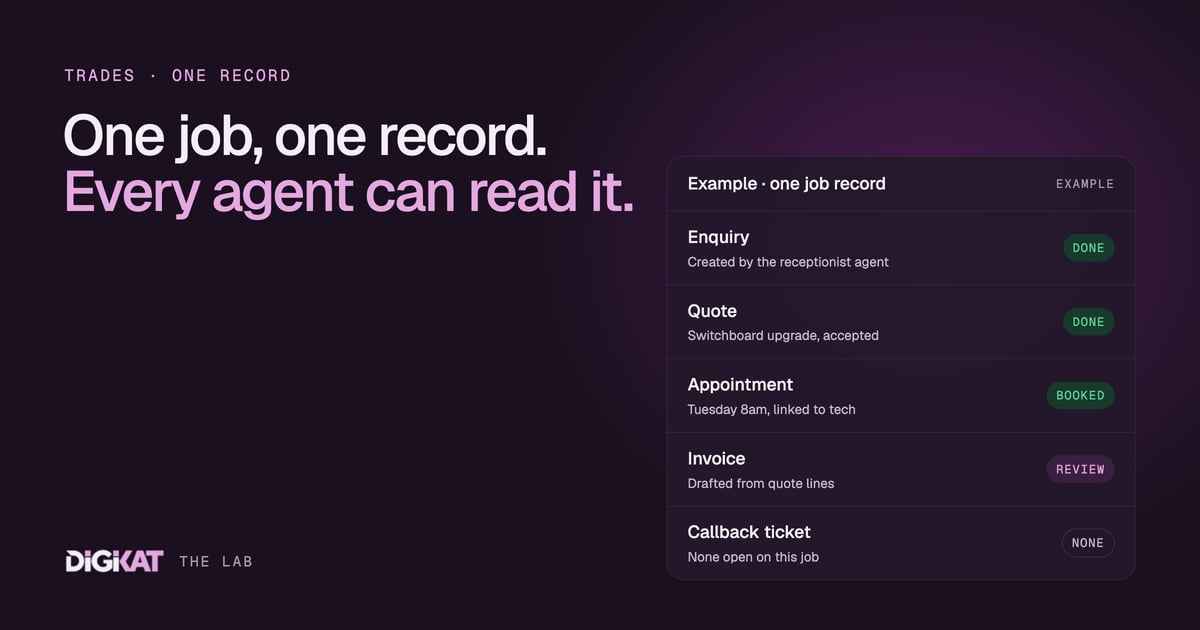
Ask most trade business owners where a job lives and you'll get a long answer. The enquiry's in the inbox. The quote's in the quoting app. The booking's in the shared calendar. The job notes are in the tech's head. The invoice is in the accounts package. Five places, and none of them talk to each other. That works fine right up until you want an agent to help, and then it doesn't work at all.
One job, five places, no story
When a job is scattered like that, nobody can see the whole story. The office can't tell whether the quote for the Henderson Street switchboard was accepted. The tech turns up without knowing the customer rang twice about access. The invoice goes out without the extra hour the job ran over. And when the customer rings in six months with a callback, nobody can find what was installed.
An AI agent has the same problem, only worse. A person can ring around and piece it together. An agent can only work with what it can see. Give it five disconnected systems and it'll either do nothing useful or confidently do the wrong thing.
So before we build any agent for a trade business, we get the job onto one record in HubSpot. Not because HubSpot is magic, but because it gives you (and the agent) a structured map: pipelines with clear stages, objects for each kind of thing, and associations that link them together. I've written a plain-English guide to pipelines, objects and associations if those words are new. Here's how they map to a trade business.
The shape we use for trades
Every trade business is a bit different, but the bones are nearly always the same.
- Contacts: the people. Homeowners, tenants, site supervisors, property managers.
- Companies: the builders, strata managers, real estate agencies and commercial clients you do repeat work for, with their payment terms on the record.
- Jobs: each job as a deal, moving through a Jobs pipeline.
- Quotes: linked to the job, with line items from your standard price list.
- Appointments: the site visit and the booked work, linked to the job and the tech.
- Invoices: raised from the job, either in HubSpot or synced from your accounting software, so the job record shows whether it's paid.
- Tickets: callbacks, warranty claims and "it's making that noise again", linked back to the original job.
Jobs as deals, or a separate jobs pipeline?
For most small trade businesses, a single Jobs pipeline does it all: Enquiry, Site Visit, Quote Sent, Booked, In Progress, Complete, Invoiced, Paid. Simple, and everyone can read it.
If you also chase bigger commercial or builder work with longer sales cycles, we split it: a sales pipeline for winning the work (tender, quote, negotiation, won) and a jobs pipeline for doing it. When a deal is won, the job is created and linked. That keeps your sales numbers honest and your delivery board uncluttered.
What about the property?
If you do repeat work at the same sites (property managers, strata, commercial clients), it's often worth a custom object for the site itself. Then the hot water unit you installed in 2023 belongs to the property, not to a tenant who has since moved out.
Why associations are the bit that matters
The objects are just boxes. The associations between them are what make the record useful. When a callback ticket is linked to the original job, which is linked to the quote, the appointment and the invoice, anyone (or any agent) can follow the thread in a few seconds.
That's what turns HubSpot from a contact list into something an agent can actually work with. It understands each object, knows where to look for the associated records, and can hand the job to the next step without anyone re-typing anything. This is also why we're ruthless about keeping it tidy. Fewer, clearer fields beat hundreds of half-filled ones, which is the whole point of deleting the properties nobody uses.
What the agents do once it's on one record
Here's how the same job record gets worked by different agents, each doing one thing well:
- The after-hours receptionist creates the contact and the job at Enquiry, with the caller's answers attached.
- Your estimator sends the quote. The quote follow-up agent nudges the customer until they say yes or no.
- When the job moves to Complete, an invoice agent drafts the invoice from the quote lines plus anything the tech added, for the office to check and send.
- If the customer rings back with a problem, the support agent finds the original job and opens a callback ticket against it, rather than starting from scratch.
No agent needs to know everything. Each one only needs to know its stage of the pipeline and how to find the linked records. That's what makes hand-offs between agents (and between agents and people) clean.
The people still own the bits that matter. A person approves every invoice before it goes, signs off any price, and handles any complaint. Agents start by drafting, and only earn more freedom once 95% of their work has been approved unchanged for two weeks.
Getting there without a big bang
You don't need to rebuild your whole business to get started. We usually go in this order:
- Agree the pipeline stages with the people who use them, and decide what has to be true for a job to move from one to the next.
- Clean up contacts and companies, so each customer exists once.
- Connect quoting and invoicing, so quotes and payment status land on the job record.
- Switch on one agent, usually the one that fixes your biggest leak, and measure it against what that job costs you today.
Our HubSpot implementation guide for Australian SMBs goes deeper on the first three. The fourth is where the invoice agent and its mates come in, and you can see how we run the whole thing on our how we work page.
If your jobs are living in five places, let's put them on one record and give your agents a map to follow. Build my solution and we'll sketch the pipeline, objects and first agent for your trade. Or start with an AI Readiness Audit to see how close your HubSpot already is.