Two of the posts readers keep coming back to on this blog are about HubSpot objects most people had never heard of: Listings and Services. At the time, we wrote about them as a better way to organise your CRM. Now there's a bigger reason to care. When you put an AI agent to work in HubSpot, the shape of your data decides what the agent can understand. A property listing stored as a deal, or a service contract stored as a note, is a puzzle the agent has to guess at. Store it as the right object and the agent just reads it.
A quick refresher on the two objects
The Listings object was built for real estate. Each listing is a record with its own properties (address, price guide, bedrooms, status, inspection times) and its own associations to vendors, buyers, enquiries and deals. Our original post on HubSpot's Listings object for real estate covers how agencies use it.
The Services object represents ongoing work you deliver after the sale: a retainer, a maintenance plan, a program, a managed service. Each service has its own stages and associates to the client company, its contacts, the deal that sold it and the tickets raised against it. Our post on the Services object for service-based businesses goes through the setup.
Both do something deals and contacts can't do well on their own. They give a "thing" in your business its own record, with its own status, that many people and records can attach to.
Why the shape of data matters to an agent
An agent doesn't browse your CRM the way a person does. It follows a path. Asked "what's happening with 12 Smith Street?", it needs to find one record for that property, then follow the associations to the enquiries, the inspections booked and the vendor. If the property lives as a deal name, or a line in a note, there's no path to follow. The agent either guesses or gives up.
That's why we say HubSpot is the agent's map. Objects tell the agent what something is. Pipelines tell it where something is up to. Associations tell it what's connected. We explain all three in our plain-English guide to pipelines, objects and associations. And if the data inside those records is patchy, the agent will be patchy too, which is the whole point of bad context in, bad agent out.
What an agent does with Listings
With listings stored properly, a support or sales agent can handle a lot of the enquiry load around each one:
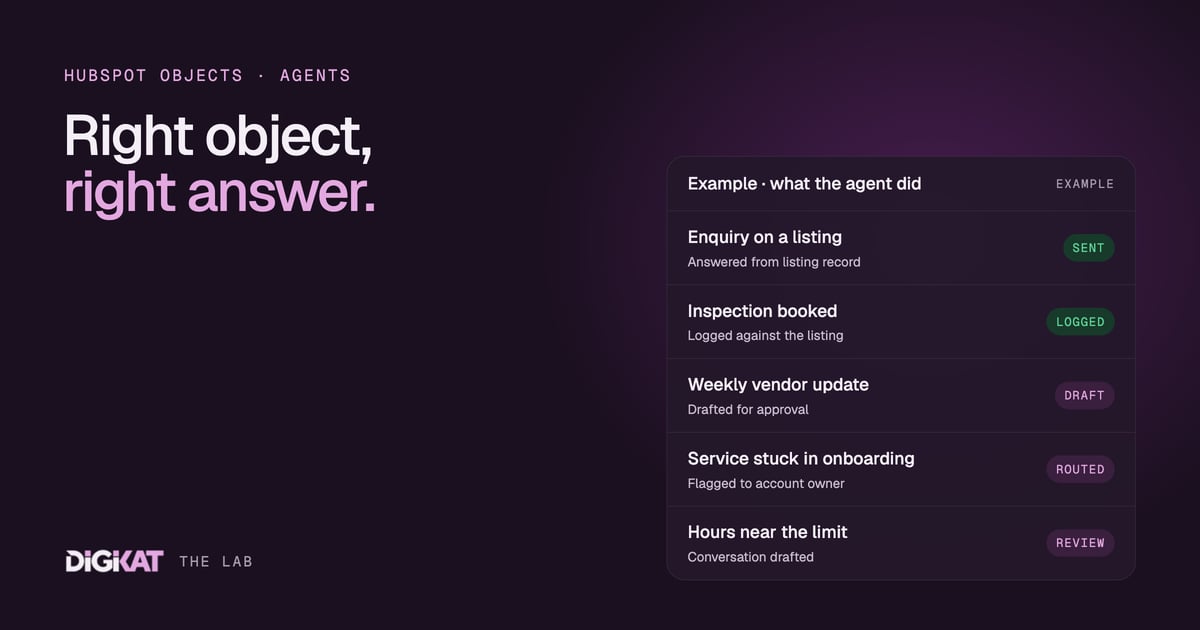
- Answer enquiries from the record: inspection times, parking, whether the property is still available, all read from the listing's own properties.
- Book and log inspections: every enquiry and booking is associated to the listing, so you can see interest building in one place.
- Follow up after an inspection: a short, approved message to everyone who attended, with the next step.
- Draft vendor updates: a weekly summary of enquiries, inspections and feedback, ready for the agent of record to check and send.
Price discussions, negotiations and anything contractual stay with a person. The agent's job is to keep the record complete and the follow-up timely.
The same pattern can suit businesses outside real estate where the "thing" has its own status and draws its own enquiries, such as hire equipment, rental units or venues. Whether Listings is the right fit there, or a custom object is better, is a design call we make during scoping.
What an agent does with Services
Services is where agents earn their keep in service businesses, because ongoing delivery is where the chasing piles up.
- A clean hand-off from sales: when a deal closes, the sales agent creates the service record, associates it to the company and the deal and passes it to delivery. We covered the sales side in how a sales agent works your pipeline.
- Stage watching: a service stuck in onboarding for longer than agreed gets flagged to the account owner with the reason.
- Usage against plan: if allocated and used hours are properties on the service, the agent can warn when a client is close to the limit and draft the conversation for the account manager.
- Reviews and renewals: the agent spots a renewal date coming up and drafts the review prep, pulling the tickets and work delivered from the associated records.
Again, the agent drafts and a person approves. Pricing, scope changes and renewals are conversations for people.
Deal, listing, service or custom object?
Most of the design work comes down to picking the right object for each thing in your business. Here's the rule of thumb we use:
- Is it a one-off sale with a close date? That's a deal.
- Is it something you offer that lots of people enquire about? That's a listing.
- Is it ongoing work you deliver after the sale? That's a service.
- None of the above? That's when a custom object earns its place.
Check that your HubSpot subscription supports the object you choose before you design around it. And don't migrate everything at once. Start with the object your first agent will rely on.
Before you switch an agent on
We follow the same four steps on every agent: Context, Action, Coordination, Result. Context comes first for a reason. We check the data, pick one job, agree what done means and measure what it costs today. Getting listings or services into the right object is often most of that Context step. Then we use HubSpot's own agents first and build custom only where they stop, test on real past cases, and start every agent in drafting mode. People approve until the agent has earned more freedom (95% of its work approved unchanged for two weeks), and every agent gets a monthly scorecard of what it did, saved and cost.
You can see the agents we build on HubSpot on our HubSpot agents page.
Give your agent the right shape of data
If your listings or services are squeezed into deals and notes, an agent will struggle, and so will your team. Book an AI Readiness Audit and we'll tell you which objects your data should live in before you build. Or go to Build my solution and we'll design the objects and the agent together.